
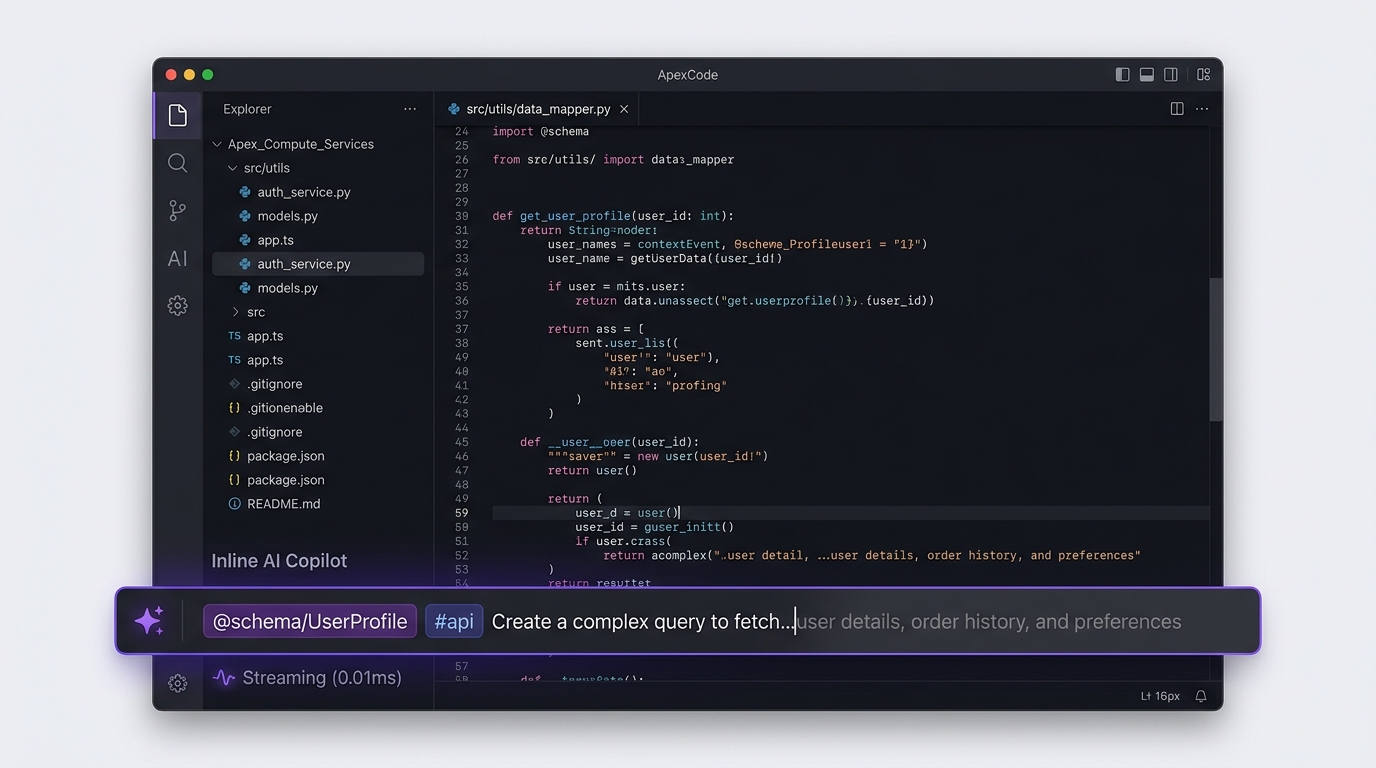
The era of the isolated AI chatbot sidebar is officially over. Across modern product engineering—from developer environments like Cursor and VS Code to collaborative canvases like Notion, Figma, and Linear—generative artificial intelligence has migrated directly into the primary editing canvas. Users no longer want to copy-paste prompts into a detached conversation panel; they expect intelligent assistance to manifest in-situ, precisely at the tip of their cursor. Yet designing inline AI copilot interactions is one of the most complex challenges in modern UI engineering. Balancing translucent ghost text suggestions, streaming token rendering jitters, contextual pill tagging, and frictionless undo mechanisms separates world-class assistive tools from infuriating cognitive distractions.
- The Sub-150ms Ghost Text Latency Budget: For autocompletion ghost text to feel magically predictive rather than sluggish, the round-trip speculative inference must land within 150 milliseconds of keystroke debounce.
- Context Injection Via Scoped Pills: Modern copilots replace free-form prompt guesswork with structured token badges (e.g.,
@schema/UserProfile,#issue-402,/summarize) that make context assembly visible, editable, and auditable. - Smooth Streaming Typography: Raw server-sent event (SSE) token chunks cause harsh visual layout shift; high-performance copilot UIs buffer incoming tokens into micro-batches with CSS interpolation to render fluid typographic reveals.
- Zero-Friction Rejection & Undo States: The user must remain in total control; continuing to type, pressing Esc, or executing Cmd+Z must cleanly discard AI suggestions without leaving residual formatting garbage or corrupting the undo stack.
The Paradigm Shift: Sidebars vs. Floating Overlays vs. In-Situ Ghost Text
Product teams integrating LLM capabilities frequently stumble by choosing the wrong interaction modality for their users’ mental models. There are three core UI topologies for generative AI assistance, each suited to distinct task complexity:
| Interaction Modality | Visual Manifestation | Ideal User Use-Case | Cognitive Friction Level |
|---|---|---|---|
| Speculative Ghost Text | Muted, translucent typography inline ahead of text cursor | Micro-completions, syntax autocomplete, sentence continuations | Minimal: Accepted with Tab, dismissed by typing |
| Floating Inline Prompt Bar | Contextual popup input hovering immediately beneath active selection | Targeted transformations (rewrite, translate, refactor, generate block) | Moderate: Pauses editing flow to direct an explicit instruction |
| Docked Assistant Sidebar | Persistent 360px vertical panel on the viewport periphery | Exploratory research, broad workspace Q&A, cross-document reasoning | High: Splits visual focus away from primary task canvas |
In high-velocity creative and technical tools, users prefer In-Situ Ghost Text and Floating Inline Prompt Bars by a factor of 4 to 1 over peripheral sidebars. When generative assistance stays within the active field of view, the user never experiences the jarring context switches that derail deep cognitive flow.
As explored in our technical deep-dive on optimistic UI architecture and local-first rollback states, creating instantaneous feedback loops is essential for keeping users in their productive flow zone.
Interaction Engineering: The Mechanics of Ghost Text Typography
Implementing ghost text seems deceptively simple: render proposed characters in a lighter font color ahead of the cursor. In practice, production UI engineering reveals significant ergonomic minefields:
1. Color Contrast & Optical Hierarchy
Ghost text must be instantly distinguishable from committed user text, while maintaining WCAG AA readability for accessibility. A common anti-pattern is using opacity (e.g., opacity: 0.3), which often causes text to fade into illegibility against tinted dark-mode card backgrounds. Instead, bind ghost text to dedicated semantic tokens with calibrated contrast ratios (e.g., `#64748b` on `#090d16` in dark mode, or `#94a3b8` on `#ffffff` in light mode).
2. Multi-Line Indentation & Virtual Whitespace
When an LLM suggests a multi-line code block or structured markdown list, the ghost element must strictly respect the parent container’s indentation and nesting hierarchy. If the suggested code breaks indentation alignment, the user experiences visual vertigo and immediately hits Escape.
3. Progressive Word-by-Word Acceptance
Advanced power users frequently want only a fragment of an AI suggestion. Top-tier implementations (such as GitHub Copilot and Cursor) support dual keyboard shortcuts:
- Tab: Accepts the entire proposed completion block.
- Cmd + → (or Ctrl + →): Accepts the next single word, keeping the remaining suggestion in ghost status. This turns the AI into an interactive co-writer rather than an all-or-nothing disruptor.
Designing the Floating Inline Prompt Bar: Context Pills & Keyboard Ergonomics
When users press Cmd+K over highlighted text or an empty line, a floating inline prompt bar should materialize with zero layout reflow. Drawing inspiration from modern command palette architecture, this component must feel lightweight, keyboard-accessible, and transparent.
Context Pill Badging
The greatest source of AI hallucination is ambiguous context. Rather than forcing users to explain what they are referring to in long prose, provide interactive context pills. Typing `@` opens an asynchronous fuzzy list of project assets (e.g., `@schema/user.ts`, `@document/onboarding-spec`), while typing `/` triggers immediate quick actions (e.g., `/fix-spelling`, `/add-unit-tests`). These pills appear as compact, dismissible chips inside the input field, clearly demarcating context from prompt text.
Streaming Latency & Perceived Speed
When the model begins generating, the interface must never freeze or present a generic spinning wheel. As detailed in our benchmark study on skeleton screens versus loading spinners in perceived performance, immediate visual feedback drastically compresses user impatience. Render a glowing wave shimmer on the input border within 50ms, followed by continuous token streaming directly into the document canvas with subtle pulse cursors.
The Non-Destructive Undo Stack & Diff Review UX
Nothing terrifies an enterprise user more than an AI tool that silently overwrites high-value content without an obvious safety net. The golden rule of copilot UX is: All AI mutations must be non-destructive, visually auditable, and trivially reversible.
1. Side-by-Side and Inline Diff Views
When an inline copilot modifies existing text, avoid simply replacing the characters. Instead, render a temporary inline diff state: red strikethrough for deleted text, soft green tint for incoming additions. A floating action pill docked to the bottom right of the changed block displays two prominent keyboard-mapped actions: Cmd+Enter to Accept, Esc to Reject.
2. Single-Step Undo Stack Compression
If an AI generates a 200-word paragraph over 3 seconds through 45 separate token chunks, hitting Cmd+Z must not require the user to hit undo 45 times to revert each individual token. The entire generative operation must be compressed into a single, discrete transaction in the editor’s undo history stack. One tap of Cmd+Z must cleanly restore the pre-prompt canvas state.
The future of enterprise software interface design belongs to in-situ ambient intelligence. Product teams that continue to bolt clunky chat sidebars onto their products are building legacy software before they even launch. By mastering sub-150ms ghost text rendering, intuitive context pill assembly, smooth token streaming, and atomic undo architectures, designers can create copilot experiences that amplify human speed and competence without ever wrestling control away from the user.
People Also Ask
What is ghost text in AI copilot UX?
Ghost text is an inline autocomplete design pattern where speculative AI predictions appear as faint, translucent text directly ahead of the user’s active typing cursor. Users can accept the suggestion instantly by pressing the Tab key or dismiss it without friction simply by continuing to type.
How do you handle token streaming jitter in generative AI web interfaces?
Token streaming jitter occurs when server-sent events deliver small, irregular text chunks that cause layout reflow and visual stuttering. Top-tier UIs resolve this by buffering incoming tokens in a lightweight client-side queue (e.g., 20-30ms) and rendering words using smooth CSS opacity transitions and fixed line-height containers to eliminate layout shifting.
What is the best way to handle undo/redo when AI generates text in an editor?
The entire generative AI output—regardless of how many streaming tokens were received—must be recorded as a single atomic mutation in the editor’s undo history stack. When the user presses Command+Z (or Ctrl+Z), the entire AI insertion should be cleanly reverted in one keystroke rather than undoing token by token.
How should an inline AI prompt bar handle user context?
An inline AI prompt bar should utilize structured context pills (chips triggered by symbols like @ for documents or # for issues) that allow users to explicitly specify references. This makes context visible, editable, and auditable while keeping prompts concise and reducing model hallucinations.