
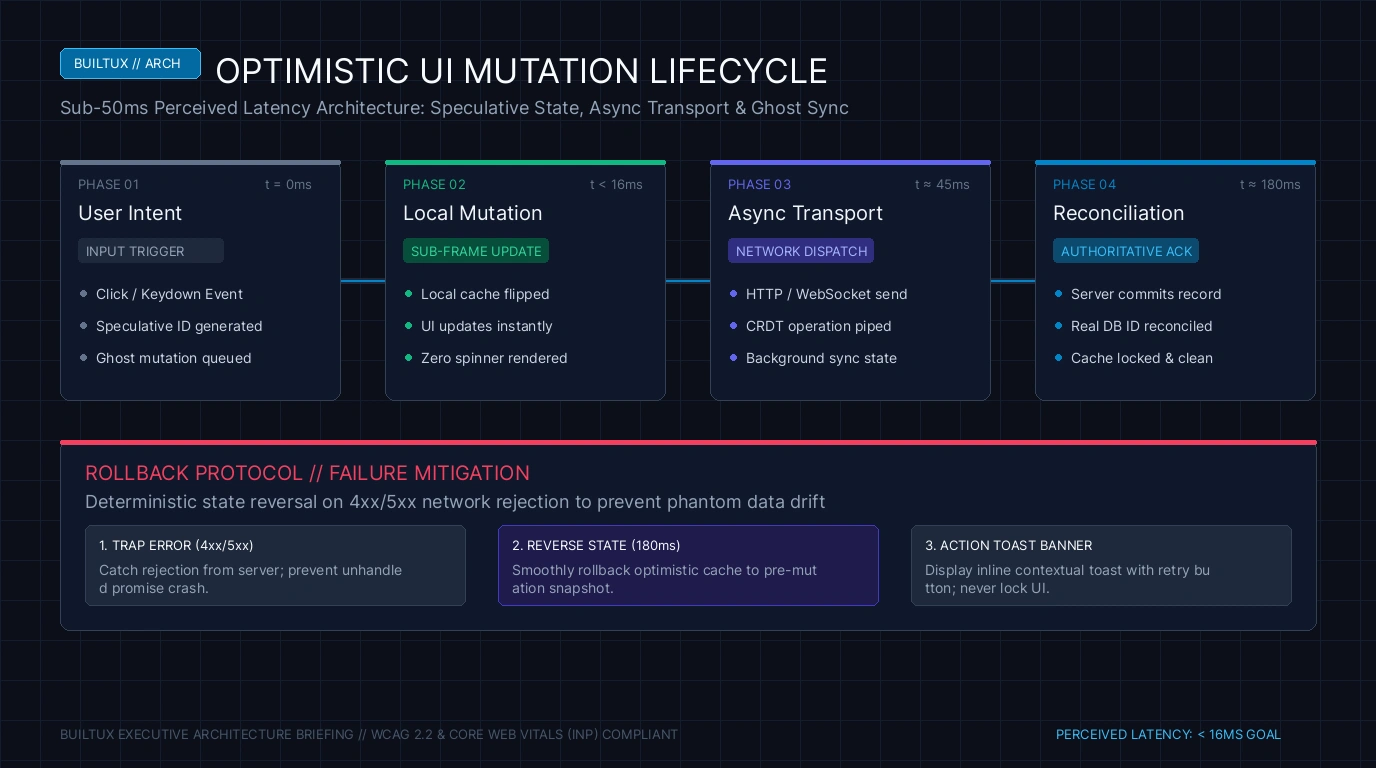
In modern enterprise B2B software engineering, there is an unbridgeable cognitive chasm separating applications that feel like sluggish, bureaucratic web forms from applications that feel like an extension of human thought. When a user creates an issue in Linear, archives an email in Superhuman, checks off a task in Todoist, or stars a repository on GitHub, the user interface updates instantaneously. There is zero loading spinner. There is zero greyed-out button state. There is zero layout jitter. The interaction feels completely local, mechanical, and instantaneous—as if the entire multi-gigabyte corporate database was running natively on the device’s silicon. In reality, that database is hosted thousands of miles away in an AWS Virginia data center, subject to the unyielding laws of physics and network packet transit times that average 120 to 300 milliseconds of round-trip latency. The architectural illusion that makes this instant responsiveness possible is Optimistic UI (Optimistic Mutation Patterns). By assuming that 99.8% of user actions will succeed on the backend, the client-side interface mutates local state immediately upon user intent, reconciles asynchronously in the background, and silently rolls back or flags state only in the rare event of a server-side rejection. But designing optimistic user ergonomics is vastly more complex than simply omitting a loading spinner. A poorly architected optimistic system causes phantom data duplicates, lost customer edits, jarring screen flashes upon network drops, and fatal data trust erosion. Mastering the ergonomics of sub-50ms optimistic software is the definitive dividing line in modern product design.
What Is Optimistic UI and Why Does Perceived Latency Matter?
Optimistic UI is an interaction design and client-side architecture pattern where the user interface updates immediately in response to a user action before receiving server confirmation. The client mutates its local cache and renders the success state instantly (<50ms), dispatching an asynchronous network mutation in the background. If the server confirms, the temporary client state is silently swapped with canonical server data. If the server rejects the mutation or the connection times out, the client executes a graceful rollback, restores prior state, and surfaces non-modal contextual remediation to the user.
To understand why optimistic interfaces dominate user perception, one must consult the empirical benchmarks of human cognitive neuroscience. In 1968, Robert Miller published seminal research on response times in man-computer conversational transactions, which Nielsen Norman Group later synthesized into three universal perceptual thresholds that remain physiologically immutable today:
- 0 to 100 Milliseconds (Instantaneous Causality): When an interface responds within 100ms, human visual cognition perceives the result as direct physical causality. The user feels as though their finger or mouse directly pushed the element, identical to flipping a physical mechanical light switch. No cognitive load is expended waiting.
- 100 to 300 Milliseconds (Slight Hesitation): The user perceives a brief computational pause. While the workflow is not disrupted, the feeling of direct physical manipulation dissolves. The user becomes aware that a software machine is processing their request.
- 300 Milliseconds to 1.0 Second (Contextual Interruption): The user’s focus begins to detach from their immediate flow state. If an input field or button freezes for 600ms, users frequently double-click in frustration, triggering duplicate database mutations, billing double-charges, or broken state queues.
- Greater Than 1.0 Second (Mental Task Disengagement): The user completely breaks flow state and mentally task-switches. Loading spinners appearing for more than one second destroy productivity and induce acute software fatigue.
Because physical transatlantic fiber-optic round-trips and database write latencies inherently exceed 150ms, traditional “Pessimistic UI”—where the client disables the interface and renders a spinner until the HTTP 200 OK payload arrives—can never achieve the sub-50ms threshold. Optimistic UI decouples human perception from network physics.
Pessimistic vs. Optimistic Architecture: The Ergonomic Matrix
To architect world-class SaaS applications, design systems must establish clear taxonomy governing which user actions qualify for optimistic execution versus which must remain pessimistic:
| Interaction Category | UI Execution Pattern | Client Feedback Mechanism | Rollback & Failure Protocol |
|---|---|---|---|
| Task Status Toggle (Checkbox / Done) | 100% Optimistic (<16ms) | Instant strike-through, checkmark animation, remove from view. | Re-appear in list with subtle red highlight and “Sync failed — Retry” toast. |
| Content Star / Bookmark / Favorite | 100% Optimistic (<16ms) | Fill icon color immediately, increment local counter. | Silently unfill icon on network drop with subtle shake animation. |
| Inline Text Rename (File / Issue Title) | Optimistic with Sync Indicator | Render new text instantly, display tiny cloud dot icon during transit. | Revert text to previous string, highlight input field in amber with edit cache. |
| Credit Card / Stripe Subscription Checkout | Strictly Pessimistic (Never Optimistic) | Disable button, render subtle inline spinner, lock payment form. | Display explicit payment gateway error message with card re-entry prompt. |
| Irreversible Destructive Action (Delete Org) | Strictly Pessimistic (2FA / Confirmation) | Modal loading overlay, block screen interactions. | Surface explicit database error dialog without modifying workspace view. |
| Complex Document Export (CSV / PDF Report) | Asynchronous Queue Pattern | Instant toast: “Export queued. We will notify you when ready.” | Surface persistent notification drawer alert if background worker fails. |
The cardinal sin of naive engineering teams is attempting to make everything optimistic. You can never execute an optimistic mutation on a financial payment transaction, a crypto wallet transfer, a password update, or a database deletion. Informing a user that their subscription was updated, only to yank back the confirmation four seconds later because their card was declined, obliterates trust. Optimistic UI is strictly reserved for reversible, low-consequence, high-frequency operational tasks where failure probabilities are under 0.5%.
The measure of a masterclass optimistic architecture is not how gracefully it handles success—it is how invisibly it handles failure. When a network connection drops mid-flight, a primitive app simply crashes or aggressively snaps the UI back to the old state with zero explanation, making users question their own sanity. An elite design system enforces the Never Flash, Never Trap Doctrine: (1) Never revert UI abruptly without micro-animation; (2) Never discard uncommitted user text; (3) Cache failed mutations in IndexedDB locally and retry automatically using exponential backoff; (4) If permanent failure occurs, surface an un-obtrusive floating toast allowing the user to copy their input or manually retry with a single click. The user’s work must NEVER be lost.
Production Case Study: Linear vs. Superhuman vs. Legacy Jira
To witness the profound business and behavioral impact of optimistic architecture, examine how three iconic platforms handle the exact same fundamental interaction: updating an issue status from “In Progress” to “Done”.
- Legacy Jira (The Pessimistic Antipattern): When an engineer clicks to move an issue in Jira, the interface disables the dropdown. A spinning blue loader appears inside the select box. The browser dispatches a REST API call to a distant server. For 400 to 800 milliseconds, the page is non-interactive. If the engineer clicks another ticket during this window, the click is swallowed or queued awkwardly. The entire application feels heavy, bureaucratic, and adversarial, leading engineers to delay updating project trackers until forced during sprint retrospectives.
- Superhuman (The Keyboard Optimistic Benchmark): In Superhuman, hitting the `E` key to mark an email as done removes the message from the inbox in under 16 milliseconds—a single 60Hz display refresh frame. The message is immediately placed in an undo queue. A subtle, non-intrusive notification appears at the bottom of the viewport with a 10-second countdown. The backend sync occurs silently over a WebSocket connection. If an error occurs, the user is alerted only after automated retry attempts are exhausted. The user operates at the speed of thought, processing 100 emails in ten minutes without encountering a single loading delay.
- Linear (The Local-First Operational Standard): Linear took optimistic design to its logical conclusion by pioneering a “Local-First” architecture. When Linear boots, it downloads the user’s entire team workspace database into browser IndexedDB. When a user creates an issue, changes an assignee, or moves a card on a Kanban board, the mutation is executed against the local in-memory database first. The client UI renders the update instantaneously. A background synchronization worker then streams changes bidirectionally to Linear’s backend using an optimized WebSocket protocol. Even if the user is working on an airplane with zero Wi-Fi connectivity, the interface remains 100% functional, queuing all mutations locally and syncing effortlessly when connectivity resumes.
The lesson for enterprise SaaS leadership is clear: perceived speed is not merely a cosmetic luxury; it is an adoption driver. Applications that respect human cognitive ergonomics and eliminate waiting latency command premium enterprise pricing power and cultivate intense organic customer loyalty.
The Anatomy of an Optimistic State Lifecycle
To design bulletproof optimistic ergonomics, interaction designers must architect five distinct phases of client state:
- Phase 1: Intent & Immediate Optimistic Projection (0 to 16ms): The user presses `Enter` or clicks an action trigger. The client instantly generates a temporary unique identifier (UUID v4), writes the record to its local client cache (React Query, Apollo Client, or Zustand store), and updates the DOM within the exact same frame (sub-16ms). The user sees their new comment, updated issue status, or moved board card immediately.
- Phase 2: Silent Asynchronous Transit (16ms to 250ms): The client dispatches a background HTTP POST/PUT mutation containing the payload and temporary client UUID. The interface remains completely interactive. The user can immediately initiate a second or third action without waiting for the first to complete.
- Phase 3: Canonical Reconciliation (Success Path): The backend database writes the record, generates the permanent database primary key, and returns the payload. The client cache quietly replaces the temporary client UUID with the permanent server record without any visual re-render or layout reflow. The user experiences zero interruption.
- Phase 4: Transient Network Interruption (Retry Path): If the network drops or the server returns a 503 Service Unavailable, the client does NOT immediately panic or rollback. It transitions the local element into a “Pending Sync” visual state (a subtle 70% opacity or a discreet offline indicator dot) and enqueues the mutation into an offline background sync queue with exponential backoff retries.
- Phase 5: Deterministic Failure & Graceful Rollback (Failure Path): If the server definitively rejects the mutation (e.g. 403 Forbidden permissions error, or 409 Conflict validation error), the client executes a choreographed rollback:
- Smoothly animates the element back to its prior state over 180ms using an easing curve (never an instantaneous snap).
- Preserves all user-entered text in local storage so zero input is erased.
- Surfaces a persistent, accessible toast banner: “Could not save changes to Issue #402. [Retry] [Copy Text]”.
Designing for Asynchronous Micro-Feedback: The “Ghost Sync” Pattern
How should a design system communicate that an optimistic mutation is in-flight without re-introducing visual clutter? Traditional SaaS interfaces made the mistake of inserting tiny spinning icons next to every saved word, creating a dizzying sea of rotating animations that triggered visual anxiety. Modern design ergonomics utilizes the Ghost Sync Pattern popularized by Notion, Linear, and Figma:
- Ambient Status Hub: Rather than attaching spinners to individual UI components, dedicate a single, unobtrusive ambient sync indicator in the global status bar (e.g. a minimalist cloud icon that displays a subtle pulsing dot during in-flight mutations, transitioning to a soft checkmark upon complete sync).
- Decoupled Typography & Opacity: While an item is in an optimistic transit state, keep its typography razor-sharp and readable. Never blur or heavily grey-out text, as this makes reading impossible during slow 3G mobile connections. If visual distinction is required, reduce container opacity by no more than 15% (e.g., `opacity: 0.85`).
- Focus Preservation: Never steal keyboard focus or reset cursor position during an optimistic update or background reconciliation. If an engineer renames a document title and continues typing a paragraph below, the background reconciliation payload must merge cleanly without knocking the cursor out of the active input field.
For more forensic analyses on enterprise design architecture, read our breakdown on Cmd+K Search UX: Designing Sub-50ms SaaS Palettes, explore design debt reduction in Design Debt Audits: Killing Dead Figma Components, or audit interface compliance in our European Accessibility Act Enterprise UX Audit.
People Also Ask
What is the difference between optimistic UI and skeleton screens?
Skeleton screens are a passive loading pattern used when fetching data from the server before anything exists on the client. Optimistic UI is an active mutation pattern where the user initiates an action, and the client displays the completed success state immediately before server confirmation.
What happens if an optimistic update conflicts with another user’s change?
In collaborative multi-user apps (like Figma or Google Docs), conflicts are resolved using CRDTs (Conflict-free Replicated Data Types) or Operational Transformation. In standard SaaS apps, the server uses timestamps or version counters (ETags) to detect conflicts and notifies the client to merge or review conflicting edits.
Should shopping cart checkouts use optimistic UI?
No. Final payment submissions, inventory reservations, and order processing should always be pessimistic. Prematurely displaying a success screen for an order that may fail payment verification causes severe customer service friction.
How do frontend frameworks handle optimistic UI?
Modern client libraries like TanStack Query (React Query), SWR, and Apollo Client provide built-in optimistic update hooks (`onMutate`, `onError`, `onSettled`) that automatically snapshot previous cache states, apply instant local updates, and rollback seamlessly on server rejection.
Sub-50ms filtering pairs directly with local-first optimistic updates. Master instant interface physics in our cornerstone guide on SaaS Filter Architecture: Faceted Search & Chip UX.