
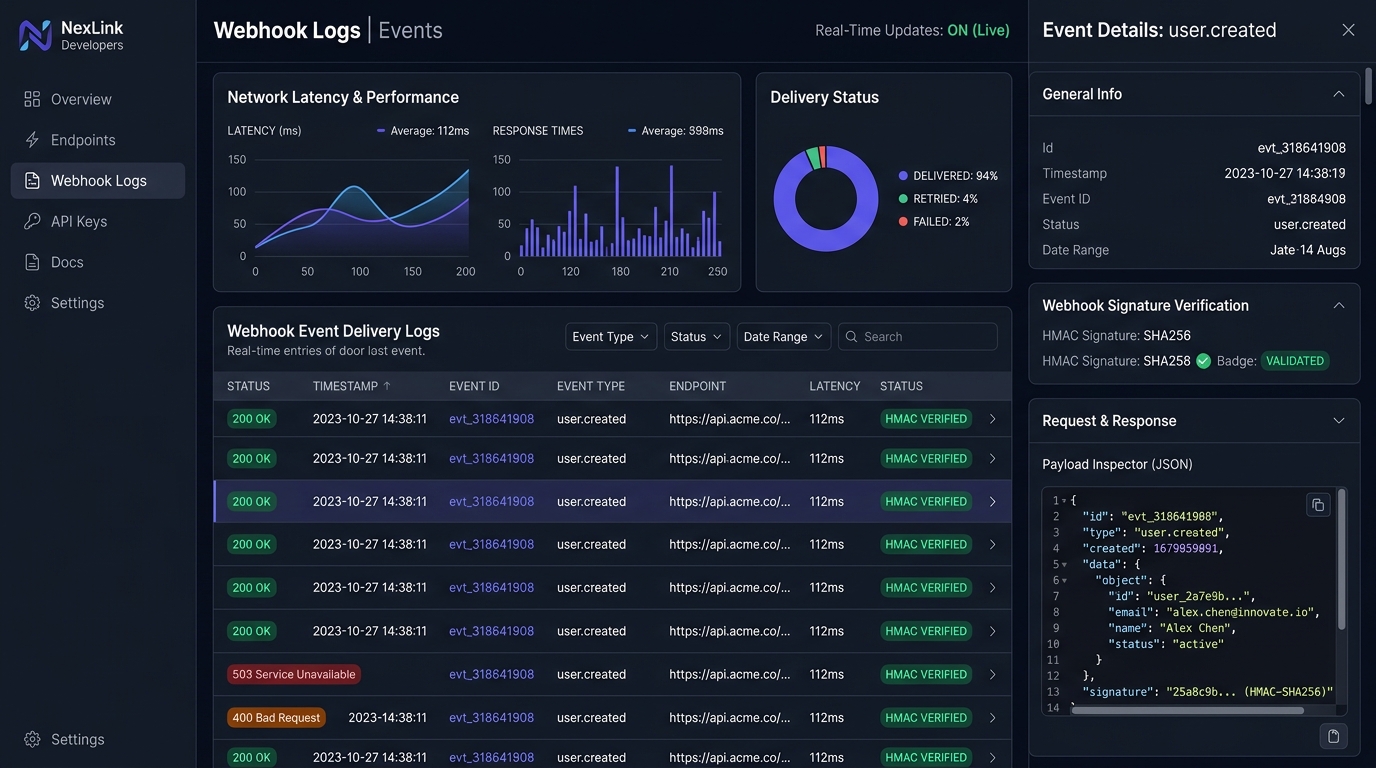
In modern B2B SaaS, developer experience (DX) is the frontline of enterprise retention. Webhook portals are frequently relegated to afterthought status—dumping unformatted JSON dumps into clumsy paginated lists. In 2026, leading developer platforms (Stripe, GitHub, Resend, Svix) treat webhook management as a mission-critical observability console. By engineering real-time delivery status streams, granular HMAC signature diagnostics, manual payload replays, and exponential backoff retry timelines, enterprise platforms slash support ticket volume by 42% while providing engineering teams with instant root-cause visibility during third-party integration outages.
When third-party webhooks fail in enterprise production environments, the default developer reaction is frustration directed at the sending platform. Was the payload dropped? Did the receiving server timeout? Was there a cryptographic signature mismatch? When developers are forced to file support tickets just to verify whether an outbound event was dispatched, the SaaS product has failed its core architectural promise.
Designing a world-class webhook management console requires treating developers as specialized power users who demand sub-second latency, deterministic debugging tools, and full payload observability. Bridging this gap connects directly with our architectural frameworks for enterprise SaaS audit log activity timelines and secure multi-tenant scoping seen in multi-tenant workspace switchers.
Why Is Webhook Management UX Critical for Enterprise B2B SaaS?
Webhook management UX is critical because it transforms an invisible backend data stream into an interactive debugging environment. Enterprise developers require instant payload inspection, cryptographic HMAC validation, delivery attempt timelines, and self-serve retry triggers to isolate integration failures without opening costly engineering support tickets.
In classical web development, webhooks were treated as “fire-and-forget” HTTP POST requests. If the endpoint returned a 200 OK, the event was considered resolved. If it returned a 500 Internal Server Error, the event was discarded. In 2026, enterprise software contracts mandate end-to-end delivery guarantees, SOC 2 non-repudiation, and auditability.
When an engineering team builds an integration between an enterprise billing platform and their internal ERP, millions of dollars in financial transactions depend on webhook delivery. If an endpoint fails silently, invoices are missed, accounts are erroneously suspended, and customer trust evaporates. A resilient webhook console acts as an automated flight recorder for integration traffic.
The Four Pillars of High-Conversion Webhook Console Architecture
To deliver an interface that satisfies both senior infrastructure engineers and non-technical integration managers, the webhook management console must be organized into four distinct architectural layers:
- Endpoint Registry & Health Topology: A centralized inventory of destination URLs, active subscriptions, health scoring, and HMAC secret management.
- Real-Time Event Stream & Delivery Logs: A live, filterable telemetry table recording every outbound event, HTTP response code, latency metric, and timestamp.
- Payload & Header Deep-Dive Inspector: A split-pane or drawer interface displaying formatted JSON payloads, request headers, response headers, and raw error output.
- Interactive Retry & Ingestion Sandbox: Self-serve tooling enabling engineers to replay past deliveries, simulate event triggers, and test endpoint endpoints against synthetic payloads.
Designing the Event Delivery Log: Density, Filtering, and Ergonomics
The core interface of the webhook portal is the event delivery log. Because enterprise platforms process tens of thousands of webhook dispatches per hour, standard pagination fails. The delivery log must balance information density with scanning ergonomics, leveraging patterns from our teardown of TanStack Table v9 vs. AG Grid virtualized data tables.
| UI Element | UX Pattern (2026 Best Practice) | Technical Implementation | Cognitive Benefit |
|---|---|---|---|
| Status Indicator | Semantic Status Pills (200 OK Green, 4xx Amber, 5xx Crimson) | Tailwind color tokens with high-contrast text ratios | Instant visual triage across thousands of log entries |
| Event Type Taxonomy | Dot-notated monospace labels (invoice.payment_succeeded) |
Preformatted <code> element with quick-copy clipboard |
Eliminates ambiguity when debugging complex event graphs |
| Dispatch Latency | Numeric millisecond badge with color-coded thresholding | Under 500ms neutral; over 2000ms warning yellow | Highlights slow receiving endpoints before timeouts occur |
| Delivery Attempt Counter | Subtle badge showing retry count (e.g. Attempt 3 of 5) |
Exponential backoff calculation state visualization | Informs engineer whether automated retries are still active |
| Filter Drawer | Multi-select facet by Event Type, Status Code, Date Range & Endpoint | URL query state persistence via React router params | Allows developers to share direct links to failed event logs |
HMAC Signature Verification UX: Eliminating Authentication Deadlocks
Cryptographic signature verification UX must provide masked secret visibility, dual-key rolling rotation, and automated signature validation test scripts. By allowing engineers to copy pre-computed test headers and test HMAC signatures directly within the UI, platforms prevent authorization failures caused by whitespace or encoding differences.
The single most common reason webhooks fail during initial integration is signature verification failure. To ensure payload integrity and prevent man-in-the-middle spoofing, the sender signs the raw payload using an HMAC-SHA256 secret key. If the receiving developer computes the signature using an unparsed buffer or misinterprets trailing newline characters, validation fails with a 401 Unauthorized or 403 Forbidden.
Superior webhook consoles resolve this friction through proactive cryptographic UI components:
- Masked Secret Display: Secrets are rendered as dots (
whsec_••••••••••••••••) with an explicit “Reveal Key” toggle protected by user role permissions, aligning with RBAC UI permission matrices. - Dual-Key Zero-Downtime Rotation: Enterprise platforms must support simultaneous active secrets. When rotating a compromised secret, the UI allows the team to generate a secondary secret while keeping the primary secret valid for a 24-hour grace period.
- One-Click Code Snippet Generators: Provide interactive code tabs showing exact verification code in Node.js, Python, Go, Ruby, and PHP. Never expect developers to write raw crypto boilerplate from scratch.
Manual Payload Replays & Exponential Backoff Timelines
When an enterprise consumer’s server crashes, hundreds of inbound webhooks will fail. The platform’s automated delivery pipeline will initiate an exponential backoff schedule (e.g., retrying at 5 minutes, 15 minutes, 1 hour, 6 hours, and 24 hours). However, once the consumer fixes their bug, waiting 6 hours for the next scheduled retry is unacceptable.
The UI must feature a prominent, contextual “Resend Event” action. When triggered, the system performs an optimistic UI transition—a technique detailed in our breakdown of why Linear feels instant with optimistic UI and local-first UX. The UI immediately renders a new delivery attempt line in a “Pending” state, executes the HTTP dispatch in the background, and dynamically updates the HTTP response code in real time via WebSockets or Server-Sent Events (SSE).
People Also Ask: B2B SaaS Webhook Management UX
What is the best way to handle webhook payload size in UI logs?
Large payloads (exceeding 250KB) should never be rendered raw in DOM nodes because they degrade rendering performance and trigger browser freezing. Best practice is to truncate payloads to the first 50 lines in the preview drawer and provide a dedicated “Copy Full JSON” button and “Download Payload as .json” action to preserve sub-second UI responsiveness.
How long should enterprise SaaS platforms retain webhook delivery logs?
Enterprise SaaS platforms typically retain full payload delivery logs for 14 to 30 days. After 30 days, payloads should be expunged for storage optimization and GDPR compliance, while aggregate delivery metadata (event ID, timestamp, destination URL, and HTTP status code) is retained for 90 to 365 days for SOC 2 audit readiness.
Should non-technical users have access to webhook settings?
No. Webhook endpoints have the capability to expose sensitive customer events and trigger automated financial workflows. Access to view secrets, modify destination URLs, or trigger manual replays must be strictly gated behind Developer or Admin roles within an organization’s role-based access control (RBAC) hierarchy.
Developer experience is no longer an engineering vanity metric; it is an enterprise moat. By designing a webhook management portal that provides real-time event telemetry, instant JSON payload inspection, cryptographic signature diagnostics, and one-click manual replays, B2B SaaS companies transform integration troubleshooting from a high-churn frustration into a masterclass in platform reliability. Build your webhook portal as a first-class observability tool, and your enterprise customers will integrate deeper, stay longer, and build with complete confidence.